
Version 1.2.6 & 1.2.7
Key Enhancements
Partner
- Course Management Post Portal Creation
- Partner users now have access to manage the full list of purchased courses available under their management scope. This ensures transparency and better control over learning content across all linked portals.
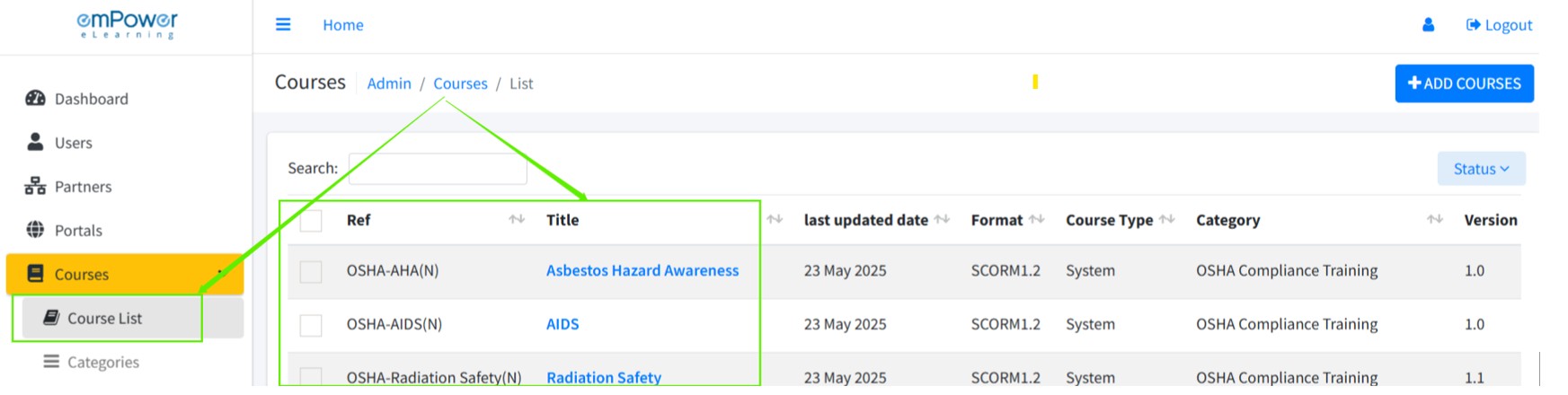
- Partner users can now manage courses for a portal after the portal has been created. This flexibility allows partners to continuously update and refine the course offerings as needed for each client.
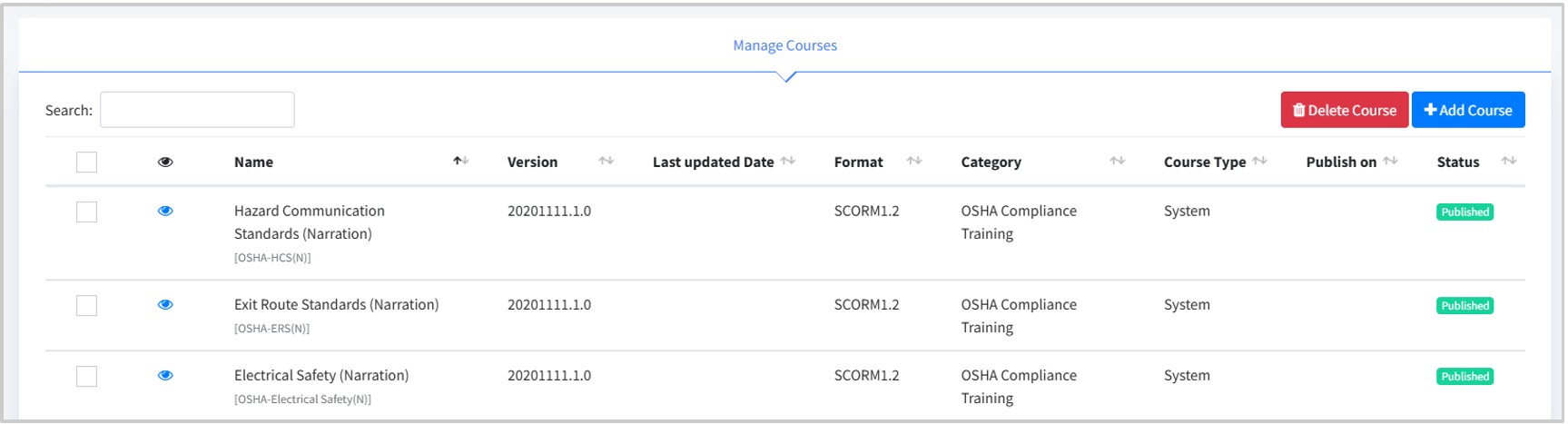
- Partner users now have access to manage the full list of purchased courses available under their management scope. This ensures transparency and better control over learning content across all linked portals.
- Domain Migration to emPower
We’ve successfully migrated all portals from the Cosaint domain(.cosaint.com) to the new Empower domain(.empowerlms.com).Users will now receive system-generated emails from: noreply@empowerelearning.comThe domain name has changed from empowerbpo.com to empowerelearning.com to better reflect our learning-focused platform. This change enhances brand consistency and provides a unified experience across our platform.Important: Please update any saved bookmarks or links to reflect the new Empower domain. - Branding on Login
Partners will now see their custom branding (logo) when logging in using their partner credentials.This personalized experience helps reinforce brand identity and makes navigation more intuitive for partner users.
Portal Administrators
- Improved User Selection for Assignments
- We’ve enhanced the user experience when assigning courses, policies, library documents, or surveys. The user dropdown menu now remains open after selecting a user or item, making it easier and faster to select multiple users without repeatedly reopening the dropdown.
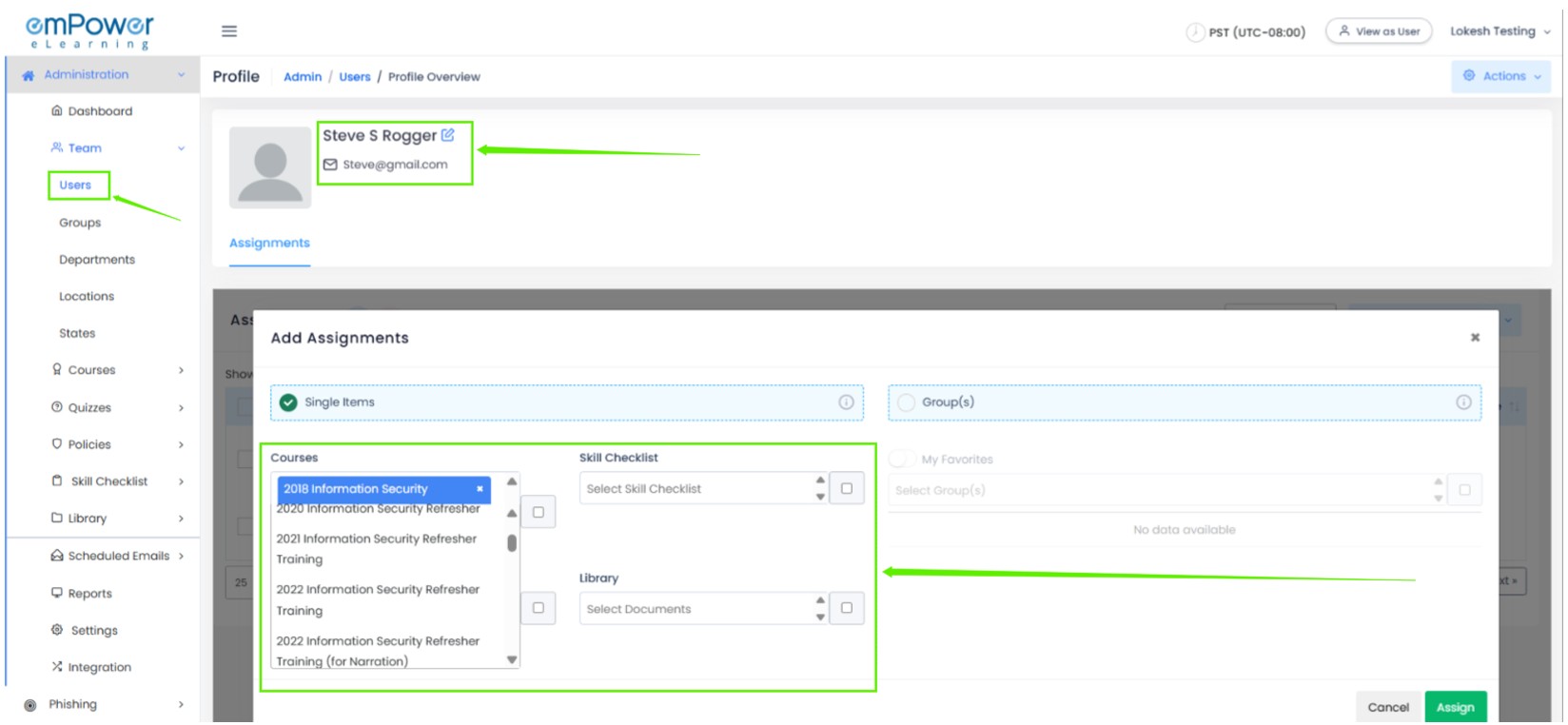
- We’ve enhanced the user experience when assigning courses, policies, library documents, or surveys. The user dropdown menu now remains open after selecting a user or item, making it easier and faster to select multiple users without repeatedly reopening the dropdown.
- Sequential Assignment
We’ve introduced the Sequential Assignment functionality to enhance structured learning paths:- Courses or modules can now be assigned in a predefined sequence, ensuring learners progress through content in the intended order.
- Learners will only be able to access the next course/module once they have completed the previous one.
- This feature helps in enforcing curriculum flow, improving knowledge retention and assessment readiness.
Note: Admins can configure sequence rules from the assignment settings page.
General
- Integrated Support Portal Access
Learners can now directly access our Support Portal from within the product. Browse through knowledge base articles to find quick answers to common questions and issues — serving as your first line of support. If the articles don’t resolve your concern, you can always reach out to us at support@empowerelearning.com or visit https://support.empowerelearning.com and raise a ticket for further help.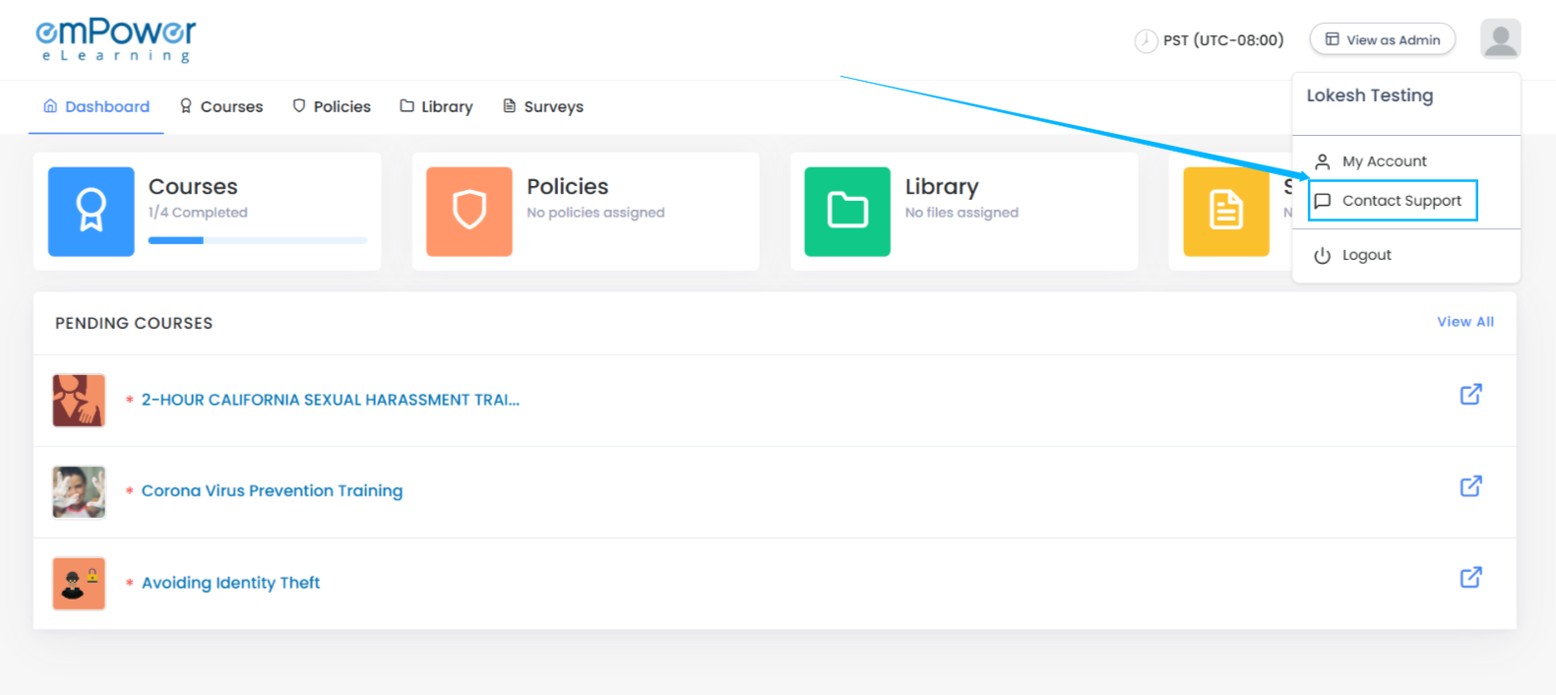
- Self Sign-up for New Learners
Unregistered learners can now create an account directly from the login page using their email ID. Admins can track self-registered users, making onboarding seamless and removing dependency on manual account creation.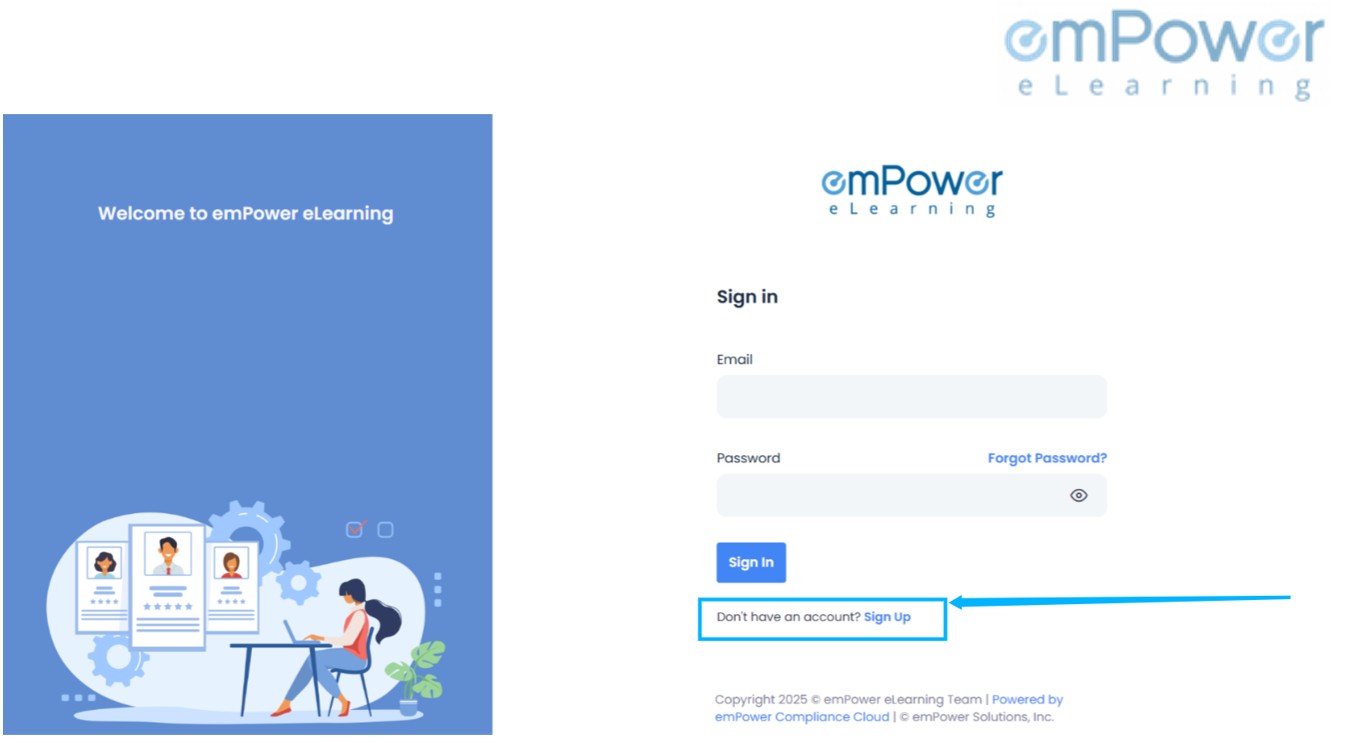
Upcoming features
- Upload xAPI-compliant course content using the existing ‘Add Courses’ functionality.
- Course version management
- Advanced quiz module – Create rich quizzes with great features and link to courses for knowledge checks and assessments.
- Dynamic role permission – Define custom roles for each portal and map menu permissions based on role responsibilities.
- License count audit log – Track all license allocation and modification actions through an audit log, enhancing transparency and accountability.
- Smart search – Easily identify users missing links to key master fields like department, manager, etc.
- Bulk user data update via CSV – Admins can download a sample CSV, update user data against email ID (used as a unique identifier), and re-upload it.
- Admins will soon be able to view all their invoices directly within the portal enabling secure, quick payments via Stripe.
- UI/UX enhancements to improve user experience across key modules.
Version 1.2.2
Key Enhancements
Administrator
- Unassignment History Recovery & Display
The new Unassignment History feature provides complete visibility into unassigned assignments, allowing users to track changes effortlessly. This enhancement also enables seamless reassignment of courses, ensuring better flexibility and control over training and task management.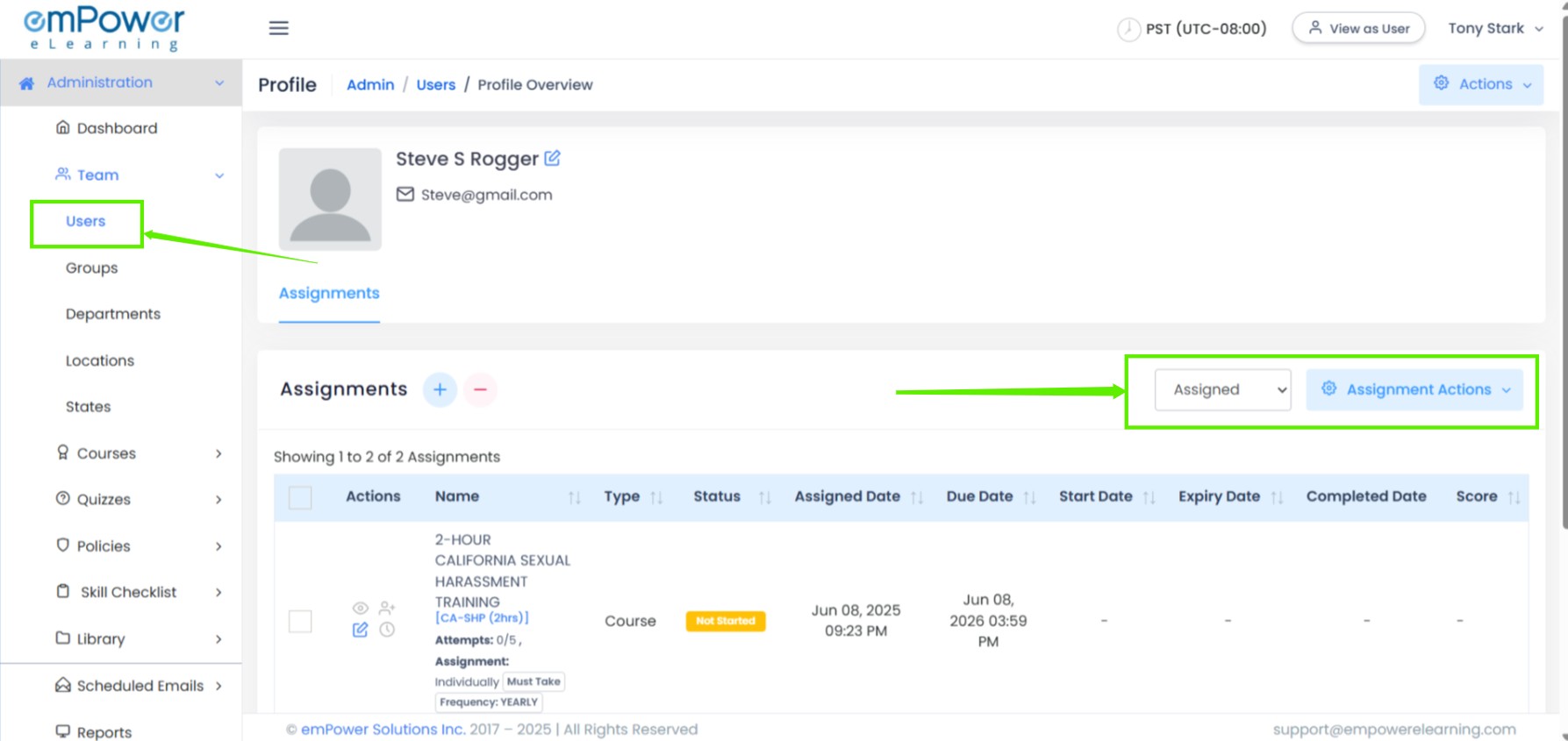
- Add-On Manager UI Update
The updated Add-On Manager UI now includes powerful features to enhance usability. With the new search functionality, category-based filters, and status-based filters, you can quickly find, organize, and manage add-ons with ease. This streamlined interface ensures a more efficient and user-friendly experience.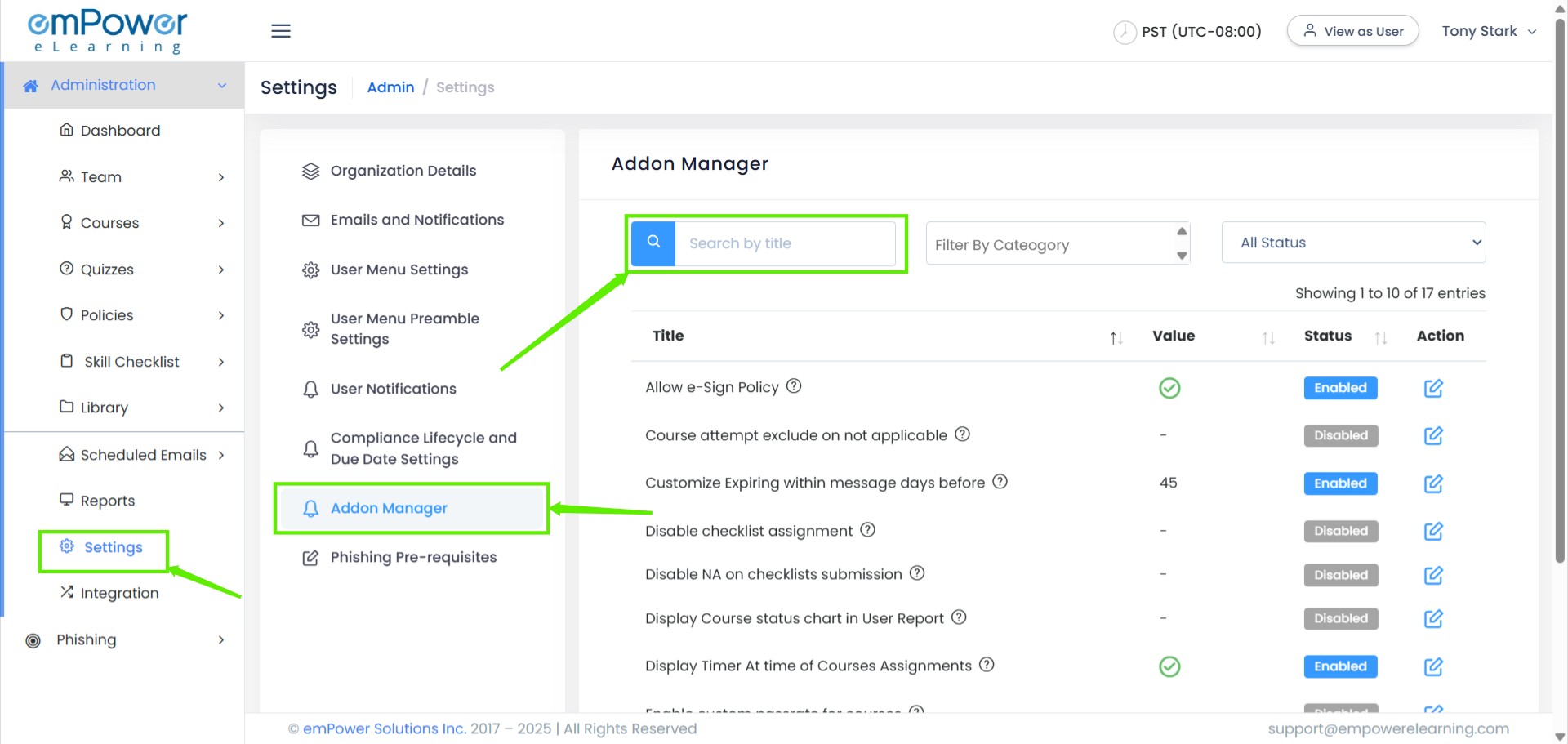
Learner
- Course Status Badges
We’ve enhanced the course tracking experience by introducing new status badges: ‘Not Started,’ ‘In Progress,’ and ‘Expired.’ These badges provide clear insights into the progress of each course, ensuring better visibility and streamlined management for learners.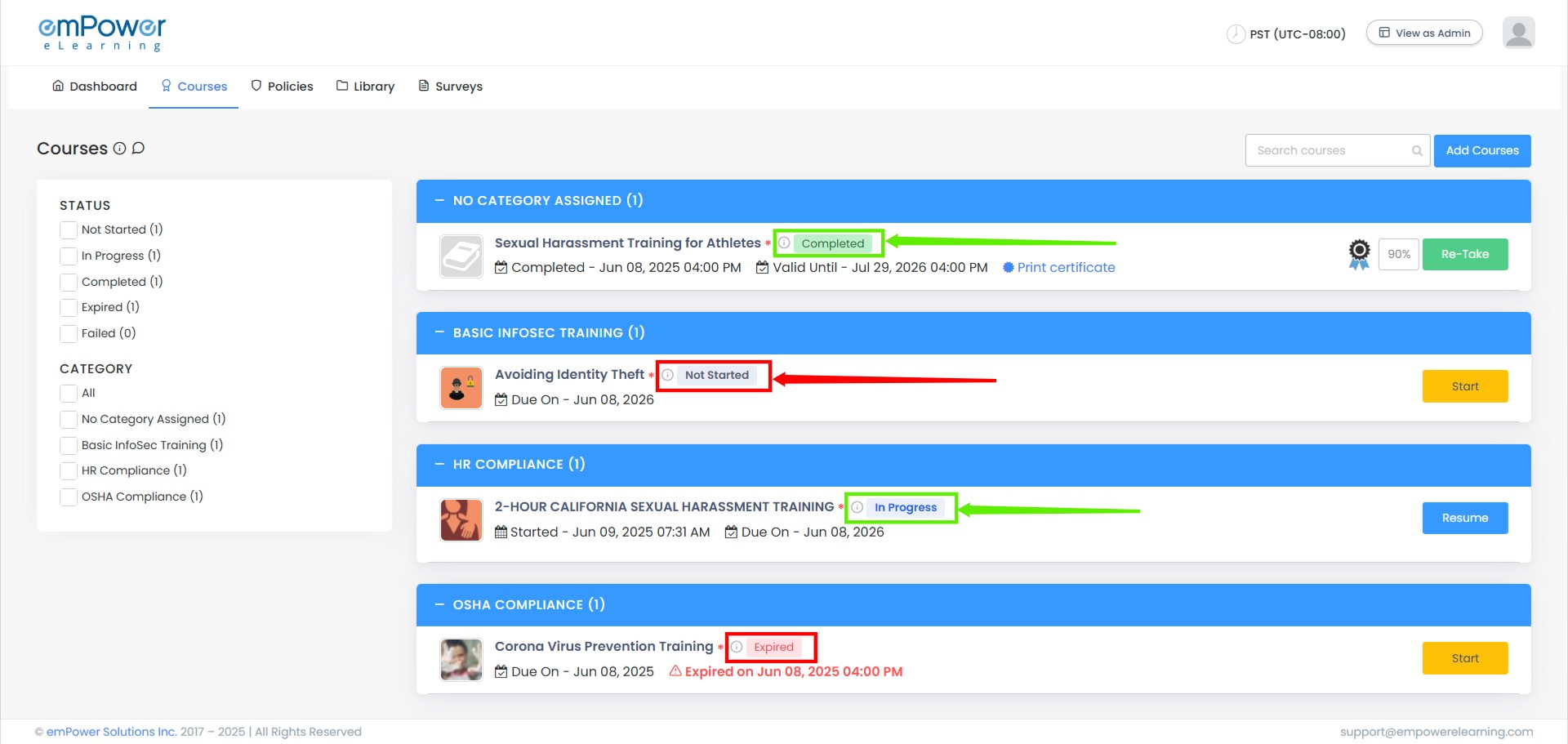
- Dashboard Course Count Update
The course counts on the dashboard have been updated for more accurate tracking irrespective of whether the courses are mandatory or not. This enhancement helps users quickly assess course progress and completion status across all the courses.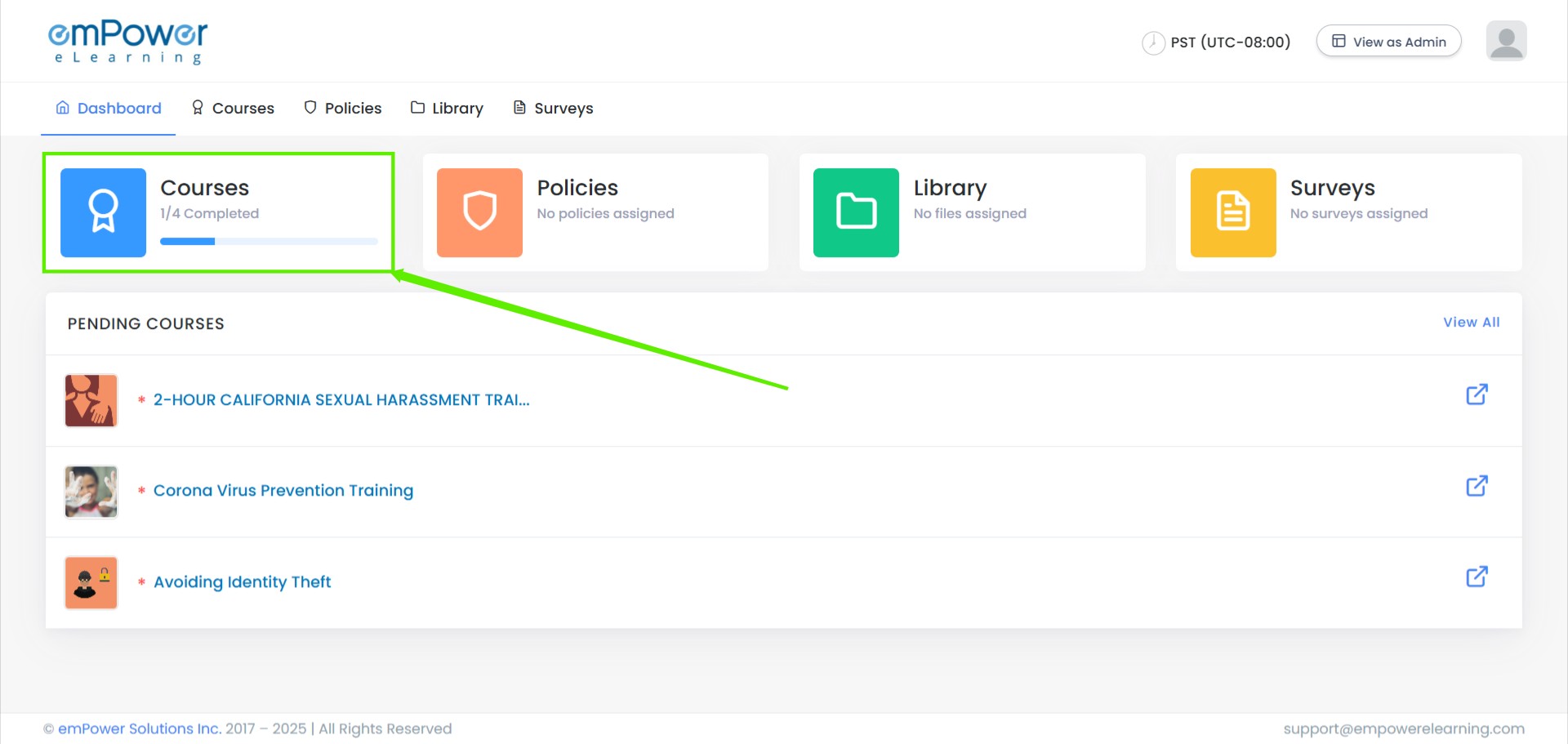
- Search and Filter Enhancements
We’ve enhanced the Search and Filter features on the course page for a seamless experience. All courses will be displayed without any filters pre-selected, giving you a clear overview. As you start selecting filters, the course list will dynamically narrow down, making it easier to find exactly what you need. Additionally, courses without assigned categories will now appear under a dedicated ‘No Category Assigned’ section.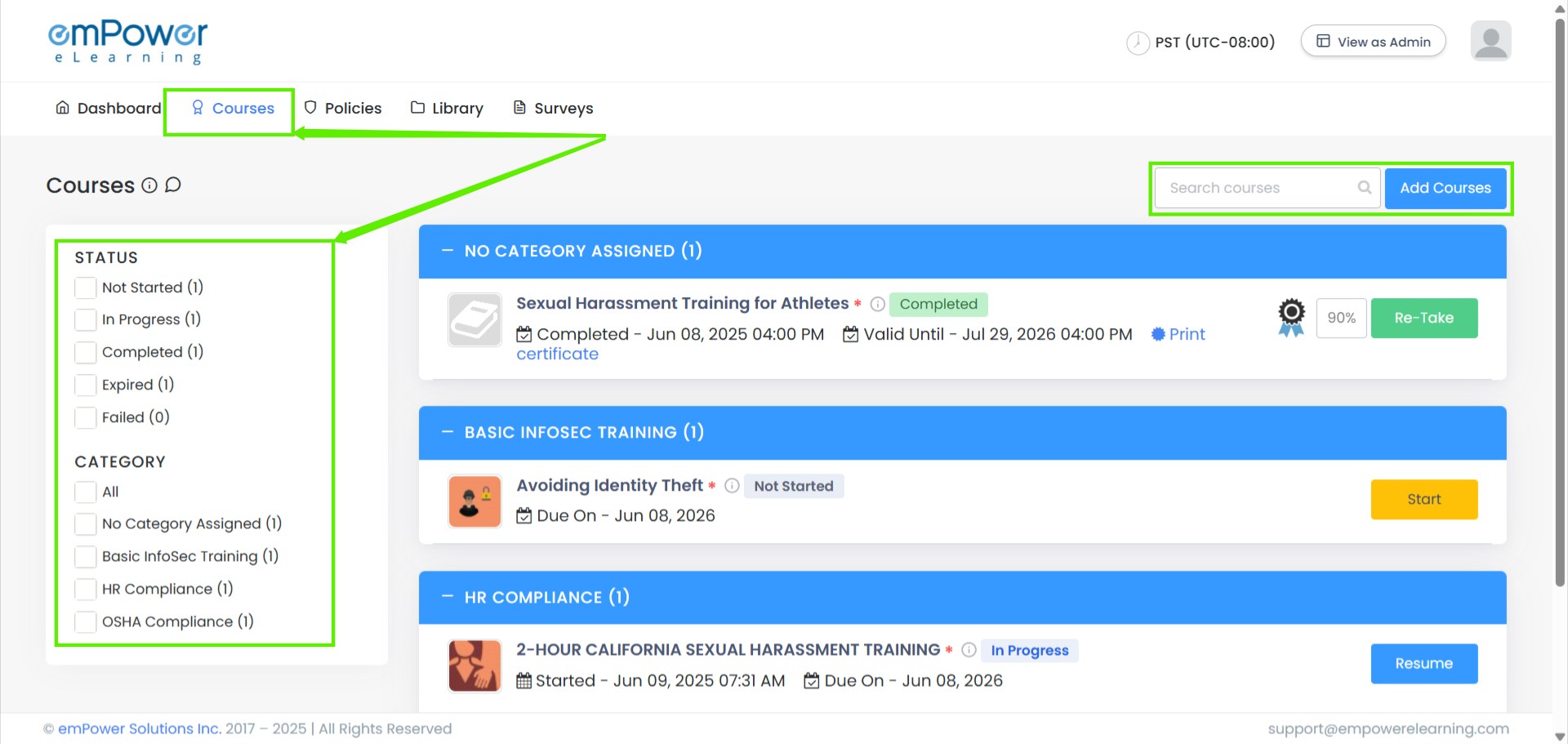
- Automatic Policy-Linked Course Assignment
With our new feature, courses linked to a policy are now automatically assigned when the policy is assigned to a learner. This seamless integration ensures learners have immediate access to the relevant courses, streamlining the process and improving compliance tracking.
General
- Improved Password Validations UI
Our improved password validation UI offers real-time feedback as you create your password. As you type, each validation rule (e.g., minimum length, special characters, numbers) is displayed and marked with a green tick when fulfilled. This intuitive feature ensures clarity and helps users confidently create strong, secure passwords.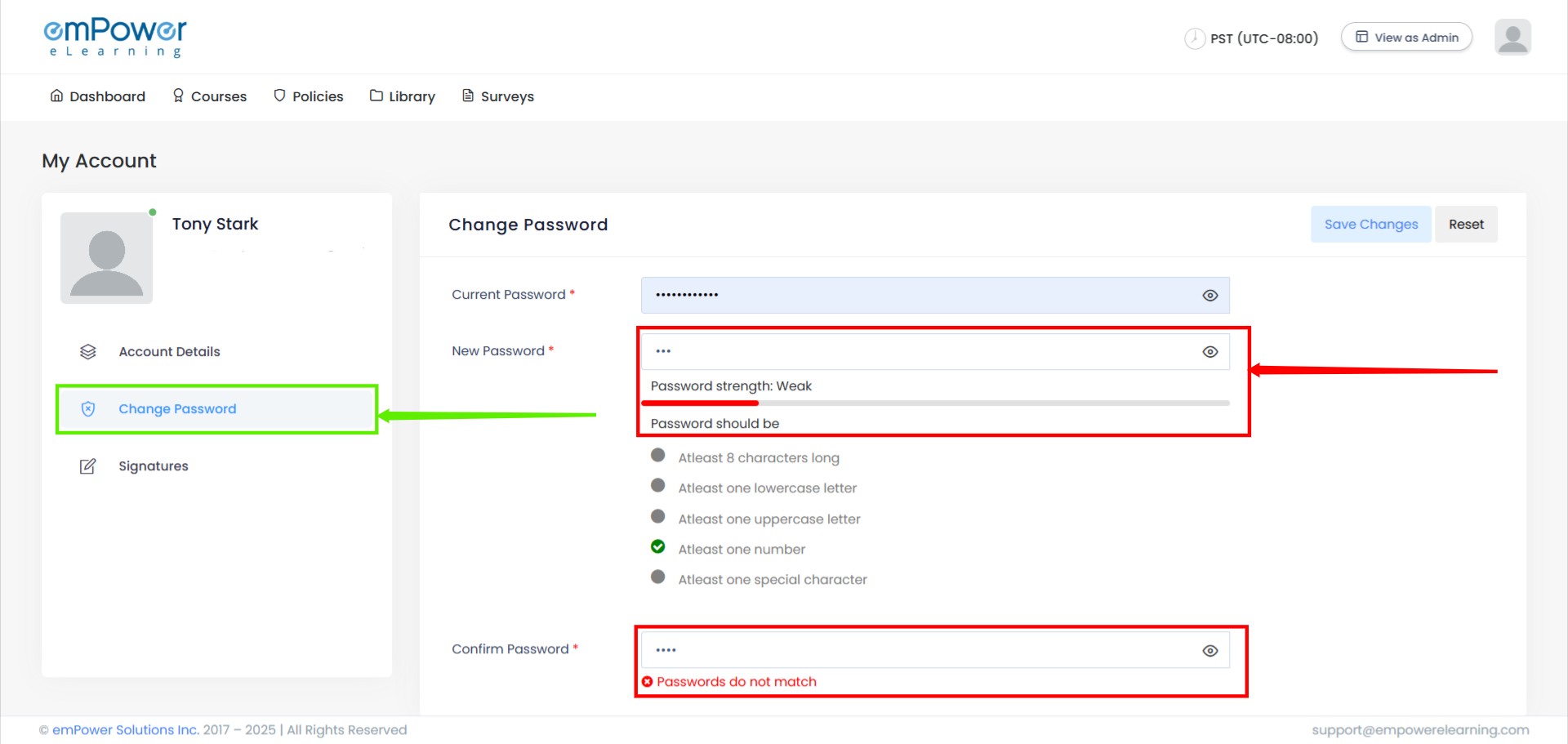
Version 1.2.1
Key Enhancements:
Administrator
- Unassignment History Recovery & Display
The new Unassignment History feature provides complete visibility into unassigned assignments, allowing users to track changes effortlessly. This enhancement also enables seamless reassignment of courses, ensuring better flexibility and control over training and task management. - Add-On Manager UI Update
The updated Add-On Manager UI now includes powerful features to enhance usability. With the new search functionality, category-based filters, and status-based filters, you can quickly find, organize, and manage add-ons with ease. This streamlined interface ensures a more efficient and user-friendly experience.
Learner
- Course Status Badges
We’ve enhanced the course tracking experience by introducing new status badges: ‘Not Started,’ ‘In Progress,’ and ‘Expired.’ These badges provide clear insights into the progress of each course, ensuring better visibility and streamlined management for learners. - Dashboard Course Count Update
The course counts on the dashboard have been updated for more accurate tracking irrespective of whether the courses are mandatory or not. This enhancement helps users quickly assess course progress and completion status across all the courses. - Search and Filter Enhancements
We’ve enhanced the Search and Filter features on the course page for a seamless experience. All courses will be displayed without any filters pre-selected, giving you a clear overview. As you start selecting filters, the course list will dynamically narrow down, making it easier to find exactly what you need. Additionally, courses without assigned categories will now appear under a dedicated ‘No Category Assigned’ section. - Automatic Policy-Linked Course Assignment
With our new feature, courses linked to a policy are now automatically assigned when the policy is assigned to a learner. This seamless integration ensures learners have immediate access to the relevant courses, streamlining the process and improving compliance tracking.
General
- Improved Password Validations UI
Our improved password validation UI offers real-time feedback as you create your password. As you type, each validation rule (e.g., minimum length, special characters, numbers) is displayed and marked with a green tick when fulfilled. This intuitive feature ensures clarity and helps users confidently create strong, secure passwords.